Best construction calculator apps
Every construction calculator app worth knowing about in 2026, compared feature by feature against each product's own store listing and documentation. Full disclosure: we make CutOnce, so it is on the list, our top pick is argued from sources you can click, and we say exactly where the others beat it.
Updated
The short version
CutOnce, our app, is the pick for labeled forms, IRC-checked stairs, and printable PDF cut plans. Construction Master Pro is the pick if you already know the classic handheld keystrokes. BuildCalc is the strongest one-time-purchase alternative, and Blocklayer.com covers the same ground free in the browser, nothing to install.
On this page
The feature matrix
Twenty-three apps and tools, ten capabilities each, every claim checked against the developer's own store listing or documentation. This is the broadest side-by-side matrix we could assemble from first-party sources. Where a listing does not state a capability we say “Not documented” instead of guessing: an empty-looking cell means the developer never claimed the feature, not that we skipped checking.
Filter
Showing 23 of 23 apps
How to read this table
- Yes:
- the developer's own listing or docs state the feature
- No:
- outside the product's stated scope
- Partial:
- supported with a caveat, noted per cell
- Not documented:
- the developer's materials do not state it either way
Every non-empty cell was checked against a first-party source, most recently on 2026-09-08; each app name links to the listing we checked.
| Developer | Platforms | Last updated | ||||||||||||
|---|---|---|---|---|---|---|---|---|---|---|---|---|---|---|
| CutOnceOurs | Verik Labs | iOS · Android | One-time purchase | 2026-08 | YesDown to 1/64 in, entered the way a tape reads | PartialImperial or metric app-wide in settings, not mixed in one calculation | YesFull stringer layout from one total rise, IRC R311.7 checks | YesCommon, hip, valley, and jacks, including irregular pitch | Yes | Yes | YesSlabs, bags, footings, blocks with rebar and grout | YesDedicated trig mode, degree or DMS entry | YesDimensioned PDF cut plans | Yes |
| Construction Master Pro | Calculated Industries | iOS · Android | Subscription | 2026-08 | Yes | Yes | Yes | YesRegular and irregular hip, valley, and jacks | Yes | Yes | PartialFootings and blocks; no rebar function listed | Yes | Not documented | Not documented |
| BuildCalc | 42nd Parallel | iOS · Android | One-time purchase | 2026-09 | Not documented | Not documented | YesAdvanced options with dimensioned stringer drawings | Yes | PartialVia hip and rafter analysis; no standalone pitch key listed | Not documented | PartialMasonry and footings, one size at a time | Not documented | Yes | Not documented |
| Chippy Tools: Construction | Peth Pty Ltd | iOS · Android | Free + paid unlocks | 2026-06 | Yes | Yes | Yes | NoNo rafter calculator in the listed toolset | Yes | No | YesSlabs and post holes | YesTriangle solvers | Not documented | Yes |
| Construction Calculator (xNeat) | xNeat.com | iOS | Free + paid unlocks | v2.9.30 | Yes | Yes | PartialSold as a separate paid add-on | PartialSold as a separate paid add-on | Not documented | Not documented | Not documented | Not documented | Not documented | Not documented |
| Construction Calculator A1 | Binary and Bricks | iOS · Android · Web | Free + paid unlocks | 2026-08 | Yes | Yes | PartialConcrete staircase estimating, not stringer cut layout | PartialRafter length for gable and flat roofs | Yes | Not documented | Yes | Not documented | YesPDF and Excel reports | Yes |
| Concrete Calc Pro | Calculated Industries | iOS · Android | Subscription | 2026-01 | Yes | Yes | YesConcrete stairs with code-aware layouts | No | No | No | YesIncludes rebar spacing, sizing, and quantities | PartialDMS conversion only; no trig function keys listed | Not documented | Not documented |
| Blocklayer.com | Blocklayer.com | Web | Free | n/a | Yes | Yes | Yes | Yes | Yes | Not documented | Yes | PartialTriangle and circle solvers; no DMS entry | PartialPrintable templates rather than PDF export | No |
| The Chippy Calc | Vike Digital | iOS · Android | Free + paid unlocks | 2026-07 | PartialImperial supported; fractional tape entry not stated | Yes | Yes | YesGable and skillion | Yes | Not documented | Yes | Yes | Yes | Yes |
| Feet & Inch Construction Calc | Winograd Apps | iOS · Android | Free + paid unlocks | 2026-08 | Yes | Yes | Yes | Yes | PartialSlope and drop tooling; no standalone pitch module named | Yes | Yes | PartialTriangle solving; no trig function keys listed | YesFor spacing, baluster and fence, and deck layouts | Not documented |
| Builder's Helper MAX | My Pie Interactive | iOS | Free + paid unlocks | 2022-07 | Yes | Yes | Yes | Yes | Yes | PartialImperial mode only | Yes | PartialTriangle solving; no trig function keys listed | Yes | Not documented |
| Construction Calculator (Aink Studio) | Aink Studio | Android | Free with ads | 2026-04 | Not documented | Not documented | Not documented | Not documented | Not documented | Not documented | Yes | Not documented | Not documented | Yes |
| Concrete Calculator Plus | Calc Hub | iOS | Free | 2024-03 | PartialInches, feet, yards, or metric; fractions not stated | Yes | PartialConcrete volume for steps, not stringer layout | No | No | No | Yes | No | Not documented | Not documented |
| Rebar Calc | Appco | iOS · Android | Free with ads | 2026-05 | Not documented | Yes | No | No | No | No | YesRebar, mesh, and concrete volume | No | Not documented | Not documented |
| Carpentry & Trim Calculator | Vladislav Zhirnov | iOS | Free + paid unlocks | 2025-10 | Not documented | Not documented | Yes | Yes | Not documented | Yes | Not documented | Not documented | Not documented | Not documented |
| Cut Calculator (Bugfoot Studios) | Bugfoot Studios | iOS | One-time purchase | v4.0 | Yes | Yes | No | No | No | Not documented | No | No | Yes | Not documented |
| DEWALT Mobile ProDiscontinued | Infinity Softworks | · | Discontinued | Delisted | Not documented | Not documented | Not documented | Not documented | Not documented | Not documented | Not documented | Not documented | Not documented | Not documented |
| Handyman CalculatorDiscontinued | Inturi | · | Discontinued | Delisted | Not documented | Not documented | Not documented | Not documented | Not documented | Not documented | Not documented | Not documented | Not documented | Not documented |
| Measure Master Pro | Calculated Industries | iOS · Android | Subscription | 2026-07 | Yes | Yes | No | No | No | Yes | No | PartialDMS conversion only; no trig function keys listed | Not documented | Not documented |
| C-Calc | Snappy Appz | Android | Free with ads | 2026-02 | Yes | Yes | No | No | No | Not documented | No | No | Not documented | Not documented |
| Construction Calculator Master | Uncaught Exception | iOS · Android | Subscription | 2023-10 | Yes | Yes | No | Yes | Yes | Not documented | YesFootings and blocks, per the Android listing | Yes | Not documented | Not documented |
| powerOne | Infinity Softworks lineage (Crafty Weasel) | iOS · Web | Free + paid unlocks | 2025-08 | Yes | Yes | Not documented | Not documented | Not documented | Not documented | Not documentedConstruction template pack claimed; individual templates not enumerated | Not documented | Not documented | Yes |
| Crown Calc Elite | Cyberprodigy | iOS | One-time purchase | 2026-06 | No | No | No | No | No | No | No | NoCrown moulding compound miter angles only | No | Not documented |
How we judged
Every app was judged on the same criteria against its live store listing and official documentation, most recently on the date below. Depth stays equal on purpose: each of the eight deep-dive apps gets the same depth of coverage, the same pros and cons treatment, and a “Where it loses” line, ours included.
Most recent listing check
Entry model
Whether you type keystroke sequences on a calculator keypad or fill in labeled fields, and whether it accepts feet-inch-fractions the way a tape reads.
Framing depth
Stairs and rafters are where construction calculators earn their keep. We looked for full stringer layouts, hip and valley math, and code awareness, not just triangle solvers.
What you walk away with
A number on a display, a saved note, or a printed plan you can carry to the saw.
Jobsite basics
Works offline, no account, and a pricing model you can explain in one sentence.
Honesty of scope
A concrete app that says it does concrete is fine; an app that implies everything and documents little is not, and its undocumented claims stay unknown in our matrix.
The eight worth using
Ranked deep dives, equal depth for every app. Competitor cards are text only: their screenshots belong to their developers, so we link you to their listings instead of borrowing images.
- 01
CutOnce
Ours · Top pickBest for form-based entry, code checks, and printed plans
Our app, so weigh this entry accordingly. Every calculator is a labeled form: the stair calculator takes one total-rise measurement and returns the whole layout with IRC R311.7 riser and tread checks shown pass or fail, and rafters cover common, hip, valley, and jack including irregular pitch, with backing angles and hip drop. Results come back as dimensioned drawings and print to PDF plans. Feet-inch-fraction entry works the way a tape reads, down to 1/64 in. Version 1.12 added a dedicated trig mode with degree and degrees-minutes-seconds entry plus five memory registers. One-time purchase after a 7-day trial, English and Spanish, iOS and Android.
- Labeled forms instead of keystroke sequences
- IRC R311.7 stair checks shown pass or fail
- Dimensioned drawings and printable PDF cut plans
- One-time purchase with free updates
- Imperial or metric per calculation is a settings choice
- Newest brand on this list
- No laser-measure integration
Where it loses: you pick imperial or metric in settings rather than mixing both inside one calculation, and it is the newest app here, without decades of field history behind the brand.
- 02
Construction Master Pro
The standardBest if you already know the handheld
Calculated Industries' app runs the same key sequences as the handheld Construction Master Pro and Pro Trig that have sat in gang boxes for decades, and its listing bundles both. Dimensional math in imperial and metric, stairs with riser limits and stairwell openings, rafters including regular and irregular hip, valley, and jacks with plumb, cheek, and level cut angles, full trig with degrees-minutes-seconds entry, board feet, and footing and block math. It saves and shares calculations and cut lists with the crew. Free download with a 14-day trial on both stores.
- Deepest keystroke-for-keystroke handheld emulation
- Regular and irregular hip, valley, and jack rafters
- Full trig with DMS entry
- Actively updated on both platforms
- Everything happens through calculator keystrokes
- Results read back one value at a time
- Full access after the trial is an auto-renewing subscription
Where it loses: there is no drawn layout or printed plan, its listings do not document PDF export or offline use, and as of this writing full access after the trial is an auto-renewing subscription rather than a one-time purchase.
- 03
BuildCalc
Power usersBest one-time purchase for advanced stair options
BuildCalc is where Construction Master users tend to land when they want off the subscription: it stays a single up-front purchase on both stores. It emulates the Construction Master keypad with a more modern interface, goes further on framing specifics with interactive stair, baluster, compound miter, diagonal, and hip and valley functions, switches between regular and irregular hip analysis, and draws dimensioned stringer, installation, and staircase diagrams you can email as a PDF. The iOS and Android builds both picked up new releases in 2026 after a quiet stretch.
- One-time purchase on iOS and Android
- Advanced stair options with dimensioned drawings
- Regular and irregular hip analysis
- PDF export of layout drawings
- Keeps the calculator-keypad entry model
- Listings leave metric and trig support undocumented
- Developer site has not kept pace with the app
Where it loses: it keeps the calculator-keypad entry model, and its own listings leave a lot undocumented, including metric and trig support, so check the current build against your needs before relying on it.
- 04
Chippy Tools: Construction
Forms-first rivalBest forms-first toolbox for site work
The closest competitor to CutOnce's entry model: Chippy Tools is a modern, forms-first toolbox from an Australian developer, with calculators for stairs, roof pitch, concrete slabs and post holes, decking, equal spacing, running measurements, and triangle trig. It supports millimeters through fractional inches, switches between metric and imperial instantly, states plainly that it works offline, and shows no ads. The free tier includes the baluster spacing calculator; the rest sits behind a Pro unlock sold as a subscription or a comparatively steep lifetime purchase.
- Modern forms-first entry like a checklist, not a keypad
- Metric and imperial switch instantly
- Documented offline support, no ads
- Strong site-work coverage: spacing, levels, soil, asphalt
- No rafter calculator in the listed toolset
- No board feet
- Pro unlock is subscription-first
Where it loses: there is no rafter calculator in its listed toolset and no board-feet math, so framers still need a second app, and most of the toolbox sits behind a subscription-first Pro unlock.
- 05
Construction Calculator (xNeat)
iOS · Feet-inchBest lightweight feet-inch keypad on iOS
A focused feet-inch-fraction calculator for iPhone that converts between all the building formats: feet-inch-fractions, inch fractions, yards, decimal feet and inches, and metric. As a plain tape-math keypad it is quick and unfussy, which is what a lot of finish carpenters actually want on the jobsite. The catch is the upgrade path: stairs, common rafters, and hip and valley rafters are each sold as separate paid add-ons on top of a premium tier, so the sticker price of the full toolbox is easy to underestimate.
- Clean, fast feet-inch-fraction math
- Converts across every building dimension format
- Free to start
- iOS only
- Stairs and rafters cost extra as add-ons
- Listing documents little beyond the core calculator
Where it loses: it is iOS-only, the stair and rafter calculators are separate paid add-ons rather than part of the app, and its listing leaves board feet, concrete, trig, PDF, and offline support undocumented.
- 06
Construction Calculator A1
EstimatorBest material estimator and BOQ generator
A1 is a different kind of tool from the framing calculators above: a materials and quantities estimator aimed at civil work, with concrete for slabs, beams, columns, footings, staircases, and retaining walls, roofing area and pitch with rafter lengths for gable and flat roofs, brickwork, steel shapes, and excavation, plus feet-inch-fraction entry with a running tape. It exports branded PDF and Excel reports, works offline, and syncs to a web version. The free tier caps you at five calculations a day; a Pro unlock or a separate Pro app on Android removes the caps and ads.
- Widest material and BOQ coverage on this list
- PDF and Excel reports with your logo
- Phone, tablet, watch, and web
- Documented offline support
- Estimating depth, not cut-layout depth
- Free tier caps daily calculations
- No stringer or hip-valley cut layouts
Where it loses: it estimates quantities rather than laying out cuts, so there are no stringer diagrams or hip and valley cut angles, and the free tier's daily calculation cap makes the paid unlock close to mandatory for real use.
- 07
Concrete Calc Pro
Concrete specialistBest dedicated concrete calculator
Calculated Industries' concrete specialist, and the strongest single-trade pick in the matrix. It covers slabs, footings, columns, and walls in feet-inch-fraction, yards, or metric, converts between cubic yards, feet, and meters instantly, figures loads, truckloads, and bag counts, and covers what general apps leave out: rebar spacing, sizing, quantities, linear feet, and weight. It even lays out code-aware concrete stairs. Like the rest of the current Calculated Industries line, full access after the free trial is a subscription.
- Deepest rebar support of any app here
- Loads, truckloads, and bag counts
- Code-aware concrete stair layouts
- Feet-inch-fraction and metric
- Concrete scope only
- Subscription after the trial
- DMS conversion but no full trig
Where it loses: it is concrete-only by design, so framers need a second app, its trig stops at degrees-minutes-seconds conversion, and full access is a subscription as of this writing.
- 08
Blocklayer.com
Free · WebBest pick straight from the browser
Blocklayer has been the free answer for years, even though app roundups rarely mention it. It is a sprawling website of interactive construction calculators: straight and spiral stairs, hip, gable, gambrel, and saltbox roofs, concrete slabs with rebar spacing and premix bags, framing, decks, fencing, and printable templates for protractors, arcs, and rafter cuts, all with diagrams and an imperial-metric toggle. For one-off math at a desk it is excellent, and it costs nothing. It is also a fair benchmark: if an app charges a subscription for math this site does free, the app needs a better reason than the math.
- Free, no install, no account
- Unusually broad calculator coverage with diagrams
- Printable templates for real layout work
- Imperial and metric throughout
- Needs a browser and a connection
- Desktop-era interface on a phone
- No saved projects or code checks
Where it loses: it needs a signal and a browser, the interface predates modern phones, and nothing checks your stairs against code or hands you a dimensioned cut plan at the saw.
The same four problems, worked
Feature lists only go so far, so here are four real jobsite problems solved in CutOnce, with the numbers from its tested calculation code, the same code our free web calculators run.
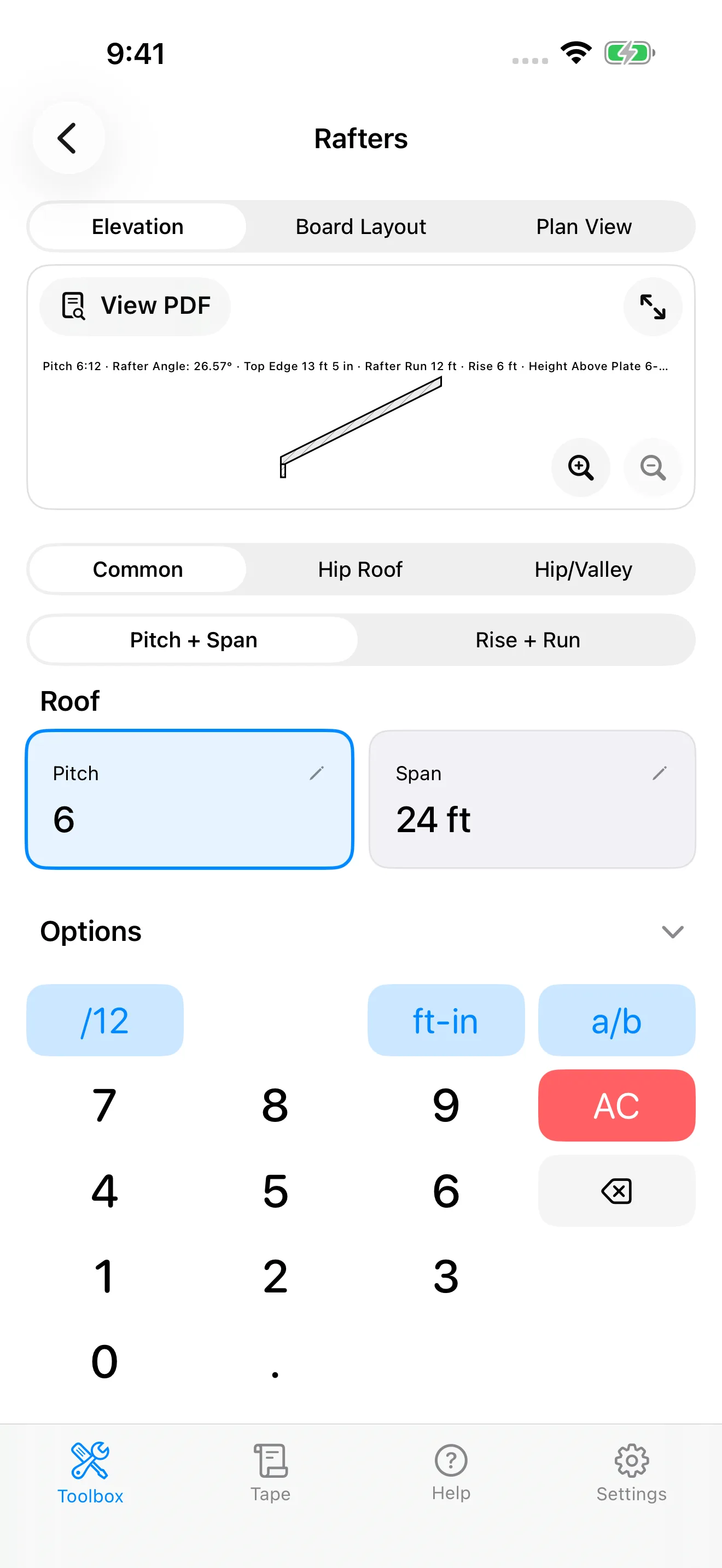
Common rafter at 6/12 over a 12 ft run
Pitch 6/12, building span 24 ft, so a 12 ft run to the ridge centerline. Rafter stock 2x8.
Line length 13 ft 5 in at a 26.6 degree plumb cut. The birdsmouth on a 2x8 takes a 3-1/2 in seat cut and leaves 6-3/8 in height above plate, drawn on the diagram and printed on the PDF plan.
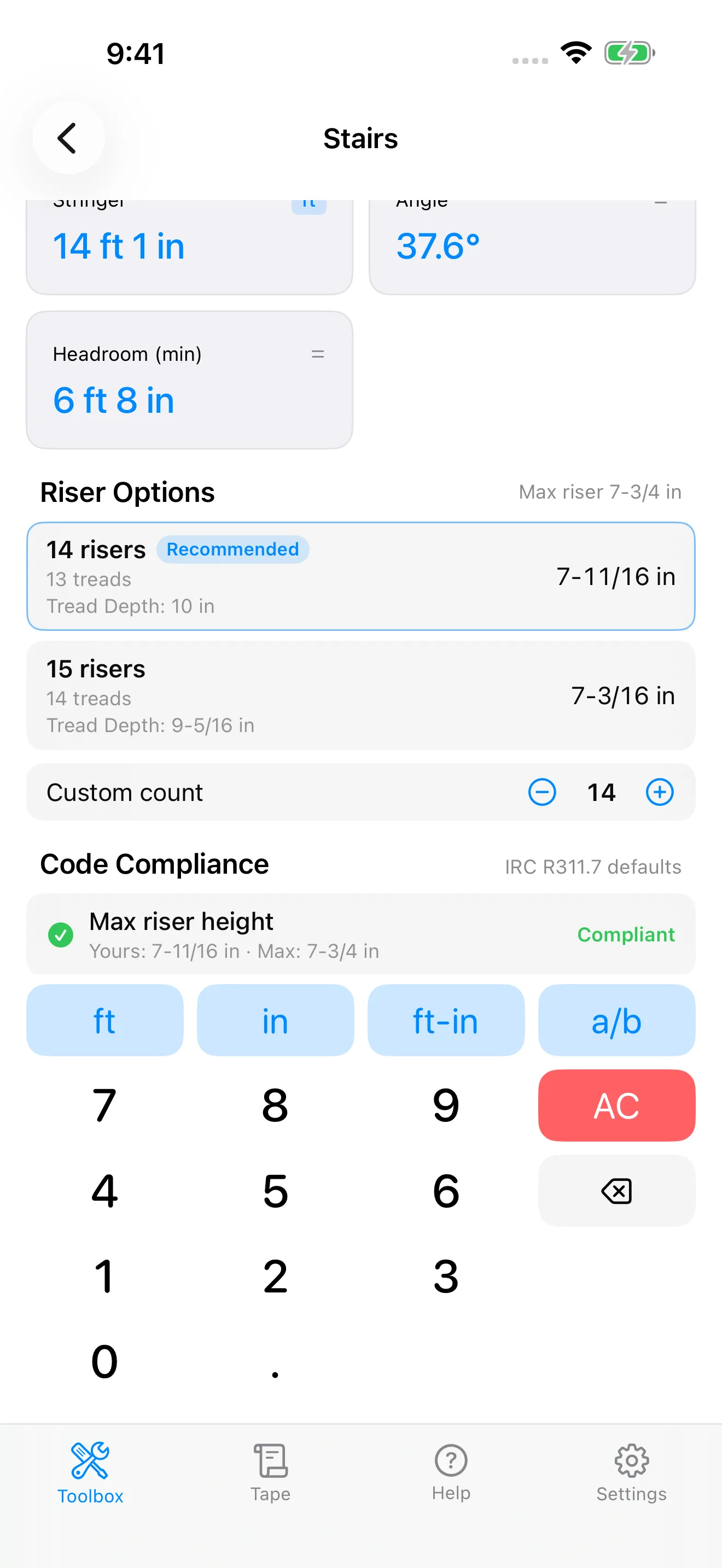
Stair stringer from one measurement: 108 in total rise
Enter the total rise, 9 ft floor to floor. CutOnce derives the run and the whole layout from that single field.
14 risers at 7-11/16 in and 13 treads at 10 in, total run 10 ft 10 in, stringer 14 ft 1 in, with every IRC R311.7 riser and tread check shown pass.
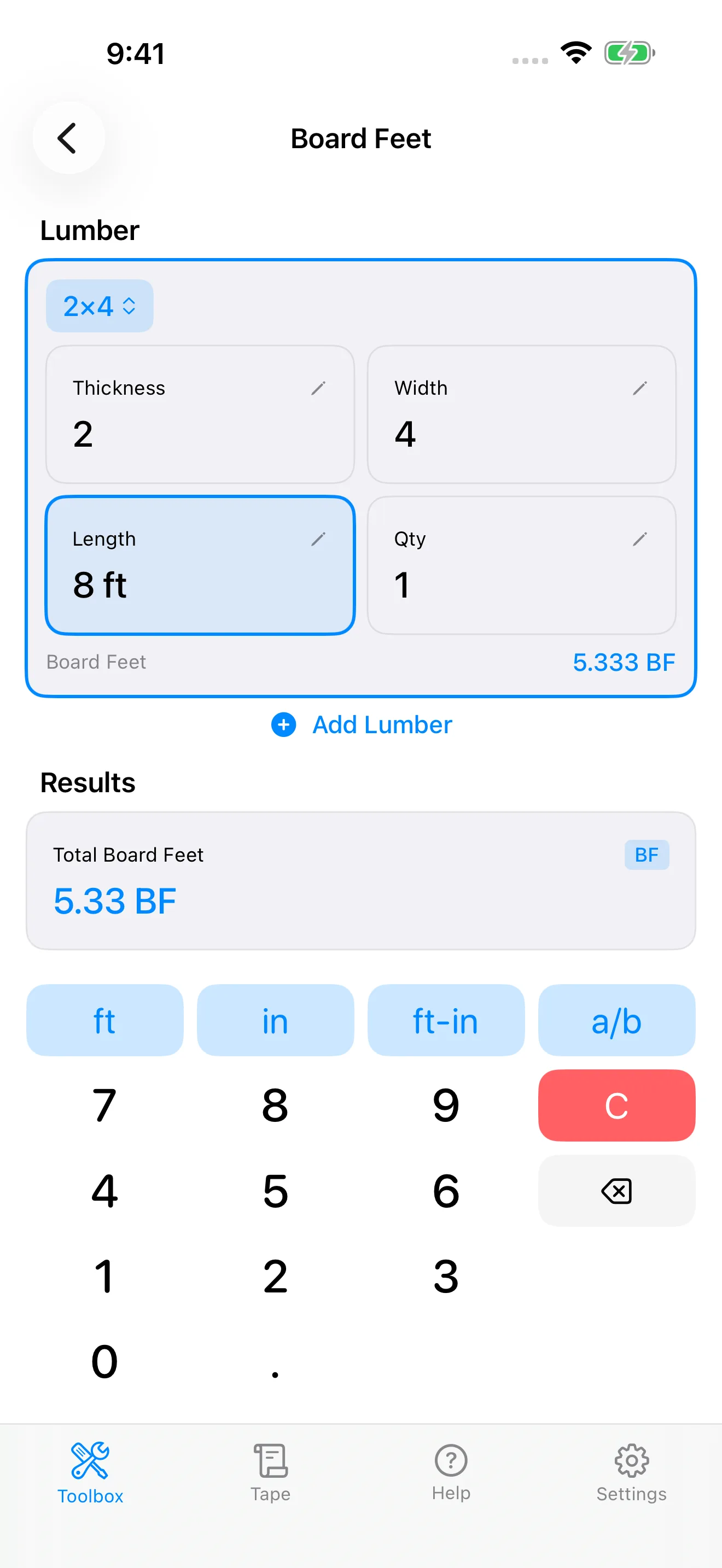
Board feet for a 2x4, 8 ft long
Pick the 2x4 from the lumber list and enter the 8 ft length.
5.33 board feet per piece, multiplied out as you raise the quantity, with the tape keeping the running total for the lumber order.
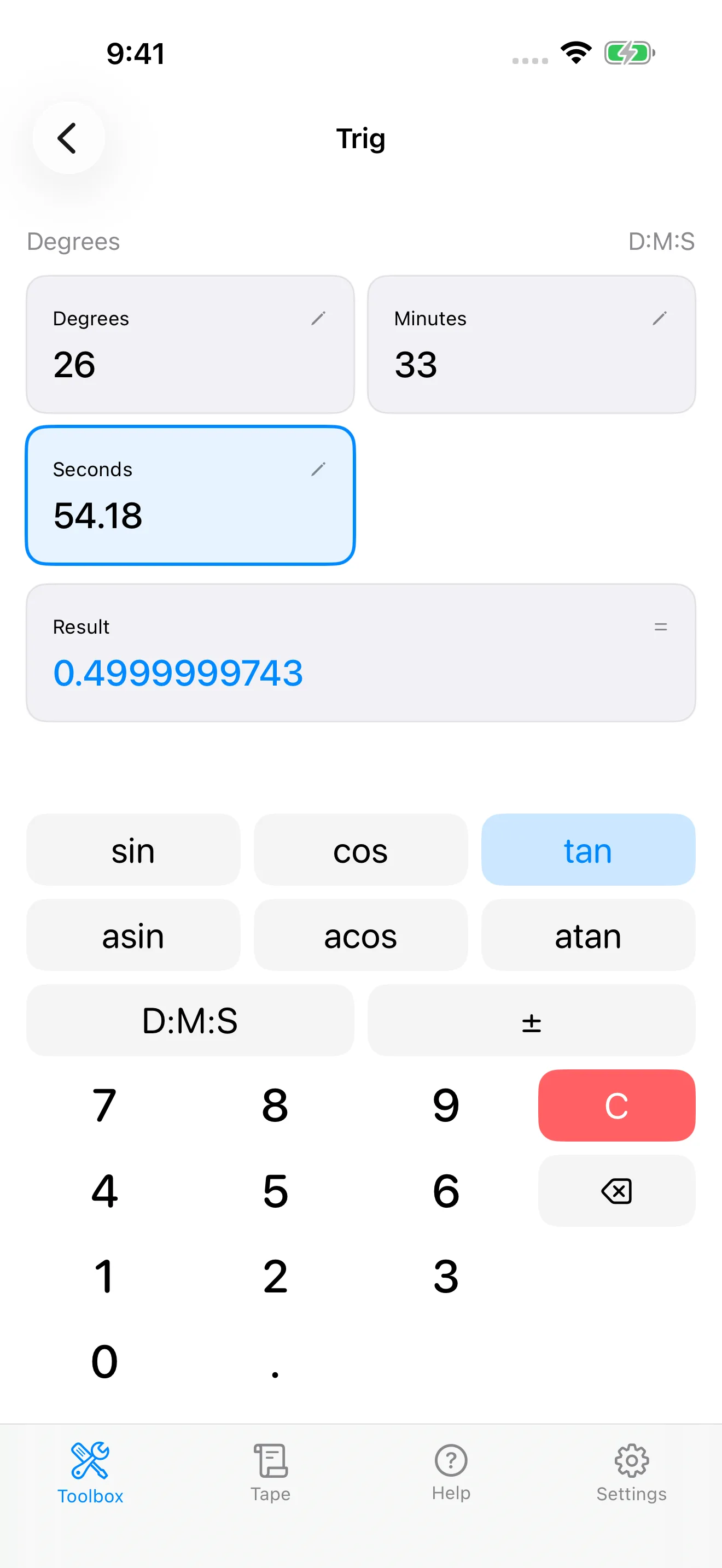
Degrees-minutes-seconds, straight off the plumb cut
Trig mode with DMS entry on: the rafter example's plumb-cut angle typed as 26° 33′ 54.18″, tangent selected.
The 6/12 pitch ratio comes back: 0.4999999743 at full display precision, a hair under 0.5 only because the seconds were rounded to two decimals. Printed to the tape like every other calculation.
Best pick by trade
- Framer
- CutOnce for drawn layouts and irregular hip and valley math; Construction Master Pro if your hands already know the keystrokes.
- Roofer
- CutOnce or Construction Master Pro for rafter math; RedX Roof below if you want full 3D roof modeling.
- Concrete
- Concrete Calc Pro for rebar depth; Construction Calculator A1 if you also estimate quantities and costs.
- Deck and stair builders
- CutOnce for IRC-checked stringers from one rise; BuildCalc for its advanced stair options on a keypad.
- DIY
- Blocklayer.com or the free web calculators below before installing anything; C-Calc on Android for free tape math.
Single-trade specialists
The generalists above exist so you do not need five single-trade apps. If you spend your days in one trade, though, these focused tools go deeper.
Stairs
StairCalc (Infoguide)
Stair framing with code checks, plus decking and concrete estimates. iOS, subscription.
Stair Tangent Dark (Sim Ayers)
Twelve stair types including circular, elliptical, flared stringers, and winders. iOS and Android, one-time.
Roofing and rafters
RedX Roof
3D roof framing engine: hip, valley, and jack rafters, sheathing layouts, cut lists, blueprints. iOS, Android, and web.
RoofCalc (Infoguide)
Hipped, gabled, and single-pitch roofs with birdsmouth and layout export. iOS, subscription.
Rafter estimator for roofing (TinuxSoft)
Rafter solving with a 2D drawing and PDF export. Android, free with ads.
SBE Builders web tools
The deepest free hip, valley, and timber-framing angle geometry on the web. Its Rafter Tools apps have left the stores; the browser tools remain.
Concrete and rebar
Foundation Footing Calculator (Zhirnov)
Strip and slab foundations with rebar and excavation. iOS, freemium.
Concrete Calc Pro and Rebar Calc
Both already in the matrix above: the subscription specialist and the free rebar estimator.
Trim and finish
Crown Calc Elite (Cyberprodigy)
Crown moulding compound miter and bevel angles per saw type. iOS, one-time purchase, in the matrix above.
Carpentry & Trim Calculator (Zhirnov)
Rafters, stair runs, board feet, and handrail parts in one young iOS app, in the matrix above.
MEP and code
Pipe Trades Pro (Calculated Industries)
Offsets, rolling offsets, cut lengths, and pipe data for pipefitters. iOS and Android, subscription.
ElectriCalc Pro (Calculated Industries)
NEC wire sizing, voltage drop, and conduit fill, 1996 through 2023 editions. iOS and Android, subscription.
AWC Span Calc (American Wood Council)
Official, free joist and rafter span calculator per the NDS. iOS, Android, and web.
Lumber
Lumber Board Foot Calculator (Innovative Tomato)
Board feet with waste factor, species, and pricing. iOS and Android, free.
WoodMaster (Lullie)
Board feet, cut lists, fraction tools, and joinery references for woodworkers. iOS and Android, one-time.
Timber Calculator Plus (SKA)
Sawmill and timber-merchant math: round logs, cut sizes, CFT and CBM, PDF invoices. iOS and Android, freemium.
Prefer a browser tool?
Most searches for construction math actually land on free web calculators. If a browser tab fits how you work better than an app does, these are the ones worth bookmarking. Our own free web calculators run the CutOnce app's tested stair, rafter, and tape-math code with no install and no sign-up.
Inch Calculator
Huge library of clearly explained construction and conversion calculators.
Omni Calculator, Construction
Hundreds of construction calculators with formulas shown.
MyCarpentry
Carpentry-focused calculators alongside plans and how-tos.
SBE Builders
Free deep roof-framing geometry from a working framer.
Concrete Network
Concrete volume tools plus contractor-grade pours and finishes guidance.
Blocklayer.com
The broadest of the web tools; covered in the matrix above.
Apps you can stop looking for
Two long-standing free recommendations are gone from the stores, and lists that still push them have not been updated in a while. DEWALT Mobile Pro was discontinued; its developer, Infinity Softworks, points former users at its powerOne app, which carries the same construction templates behind a freemium model. Handyman Calculator, for years the free Android kitchen-sink pick and an entry on our own earlier version of this page, has been delisted from Google Play and its developer site is offline. If you want free breadth on Android today, C-Calc covers tape math, Blocklayer.com and the web tools above cover the rest, and AWC Span Calc covers spans officially.
How to choose
If you already run a Construction Master handheld, get its app and keep your keystrokes, with the subscription caveat above. If you want that keypad model as a one-time purchase, get BuildCalc. If your work is concrete, get Concrete Calc Pro; if it is estimating quantities, get Construction Calculator A1; if you refuse to install anything, use Blocklayer.com or the web calculators below. And if you would rather fill in a form, see the layout drawn, have stairs checked against code, and print the plan, that is exactly the gap we built CutOnce to fill. Try its math for free in the web calculators before installing anything.
Common questions
- What is the best free construction calculator app?
- On Android, C-Calc handles feet-inch and metric tape math free with ads, and AWC Span Calc covers joist and rafter spans free from the American Wood Council. On any device, free web calculators are often the better answer for one-off math: the CutOnce web calculators run the app's tested stair, rafter, and feet-inch-fraction code with no install and no sign-up. The old free pick, Handyman Calculator, has been delisted from Google Play.
- Is there a construction calculator app that checks building code?
- CutOnce checks stair layouts against the IRC R311.7 limits for riser height, tread depth, and riser variation, and shows each check as pass or fail next to the numbers. Construction Master Pro documents riser limits in its stair function, and Concrete Calc Pro documents code-aware concrete stairs, but neither shows a per-check pass or fail readout the way CutOnce does.
- Do construction calculator apps work offline?
- Check each listing rather than assuming. CutOnce, Chippy Tools, and Construction Calculator A1 state offline support outright, and powerOne documents offline access. Construction Master Pro, BuildCalc, and Concrete Calc Pro do not mention offline use on their listings as of this writing, which is why our matrix marks them Not documented. Jobsites and basements are exactly where coverage dies, so it is worth confirming.
- Are these apps subscriptions?
- Yes, and more every year: the whole current Calculated Industries line, including Construction Master Pro, Concrete Calc Pro, and Measure Master Pro, now sells full access after a free trial as an auto-renewing subscription. Chippy Tools and xNeat are freemium with subscription tiers. The one-time holdouts are CutOnce, a free download with a 7-day trial and a one-time unlock with free updates, BuildCalc, paid up front on both stores, and specialists like Crown Calc Elite and WoodMaster.
- What are the best Construction Master Pro alternatives?
- BuildCalc, if you want the same keypad model without the subscription: it emulates the Construction Master keystrokes, adds advanced stair options with dimensioned drawings, and stays a one-time purchase. CutOnce, if you are open to a different entry model: labeled forms, drawn layouts, IRC stair checks, and PDF plans instead of key sequences. The free web route is Blocklayer.com.
- BuildCalc or Construction Master Pro?
- Construction Master Pro if you want the exact handheld keystrokes your hands know and documented full trig, and you accept a subscription. BuildCalc if you want a one-time purchase, deeper stair options with dimensioned stringer drawings, and PDF export, and you accept sparser documentation.
- What is the best replacement for DEWALT Mobile Pro?
- Its developer's own answer is powerOne, which carries the DEWALT Master Pack construction templates in a freemium calculator. If what you actually used it for was framing math, CutOnce and Construction Master Pro both go deeper than the old templates did; if it was quick mixed-unit math, any feet-inch calculator in the matrix covers it.
- What is the best stair calculator app?
- For code-checked stringer layouts from a single total-rise measurement, CutOnce. For advanced stair configurations on a keypad, including stringer throat checks and baluster spacing, BuildCalc. For unusual geometry, circular, elliptical, flared, or winder stairs, the Stair Tangent Dark specialist handles geometry the general apps do not attempt.
Try before you install
The free web calculators run the same tested code as the CutOnce app: stairs from one rise, rafters, roof pitch, and tape-measure math. If they fit how you work, the app adds the full toolbox and printable PDF plans.


See also